Place a 3D object on the floor or on a wall in augmented reality
In short
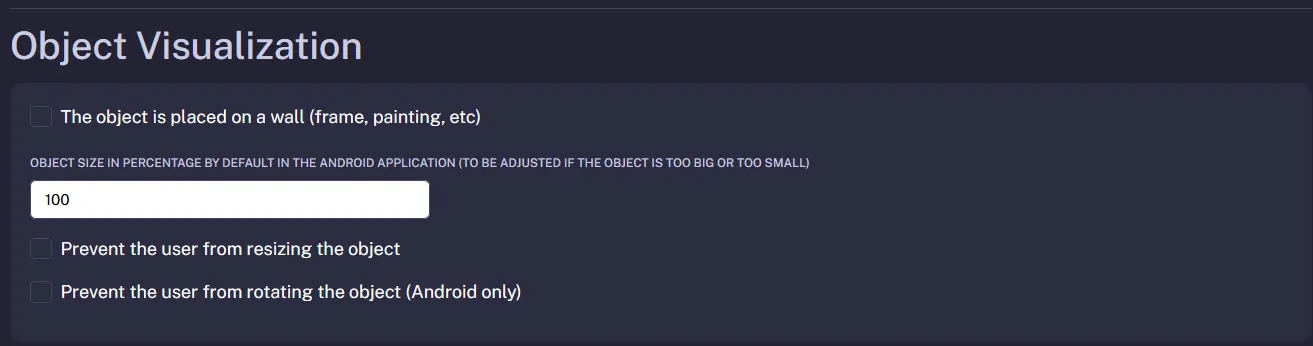
By default, a Visuality 3D object sits on the floor in augmented reality. For a painting, a mirror or a shelf, tick the The object is placed on a wall (frame, painting, etc) option in the object's settings: on Android, the object can then be hung on a wall.
In the example above, the object has been configured to be positioned on a vertical surface.
Prerequisites
- A Visuality account with an active subscription or an ongoing free trial.
- A 3D object already imported into your library (GLB or USDZ file).
- An AR-capable smartphone or tablet to test the result.
Steps: choose floor or wall placement
- In the 3D Object Library, open the object's menu (the three dots) and click Modify.
- Scroll down to the Object Visualization section.
- Tick The object is placed on a wall (frame, painting, etc) for a wall-mounted object. Leave the box unticked for an object that stands on the floor: this is the default setting.
- Click Validate to save.
- Test it: in View / Share, scan the QR code with an Android phone, tap the Augmented Reality button and aim at a well-lit wall.
The share link, the QR code and the iframe embed code stay the same: the new placement applies the next time the object is opened.
Good to know and limitations
- Android: in the browser (WebXR), the object can then only be placed on a vertical surface; Google Scene Viewer, used on some devices, also allows wall placement.
- iPhone and iPad: augmented reality opens in AR Quick Look, Apple's tool, from the USDZ file that Visuality generates automatically. This file does not yet include the wall option, so Quick Look places the object on a horizontal surface (floor or table), even if wall placement is enabled.
- With wall placement, the back of the model (the -Z side of the glTF file) is pressed against the wall: make sure the front of the product faces the right way in your 3D software before exporting.
- A plain, poorly lit wall is harder to detect than a floor: turn the lights on and aim at an area with a few visual cues (a socket, a skirting board, a frame).
- In the same section, the Adjust the object's lighting to the environment (Augmented Reality only) option turns on real-world light estimation; it only works in WebXR mode, on Android.
- In a group of objects, each object keeps its own placement mode.
Frequently asked questions
No, each object has a single placement mode. If a product can be used both ways, such as a clock or a lamp, import the file a second time under another name and set that copy to wall placement.
No. The setting is read every time the object is opened: the link, QR code and iframe you have already shared automatically use the new placement mode, with nothing to do on your side.
Visuality presses the back of the model, its -Z side, against the wall. If the front of your product does not face forward in the file, fix its orientation in your 3D software, export a new GLB and replace the file in the object's settings.
Any questions? Feel free to contact us by email at contact@visuality.fr or by phone at 05 35 54 20 41!